This is a guide to create a collection game is Scratch like this one
Let's make a character that the player can control using the arrow keys.
We want the sprite to move in 4 directions: up, down, left and right. use X and Y
We need to write code that says when the up arrow is pressed move up
Here is an example of what that looks like:
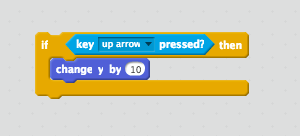
That code won't work yet though, because we need to tell it when to check if the up arrow is being pressed.
We need our code to always be checking if the arrow keys are pressed. That way the sprite will respond as soon as a key is pressed. To do that we let's add a forever block and a when green flag is clicked block. Like this:
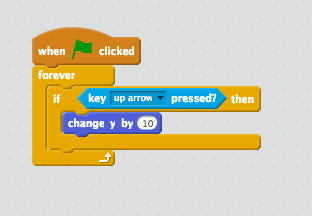
Ok, time to test. Does your character move up when the up arrow is pressed?
Do you think you can use 3 more if blocks inside the forever block to make the character move down, left and right?
We need
Let's make something to collect.
Choose a sprite to be the original for your collectibles, and give it this code to make a bunch of clones
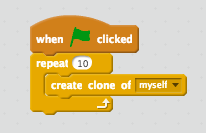
The number of times in the repeat block is how many clones you will get.
Next, let's make the clones go to new positions when they're created.
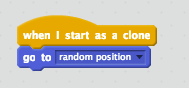
Ok let's test it! Hit the green flag and see what happens.
Great, now we need to make it so we can collect them. Let's add some more code under the when I begin as a clone block.
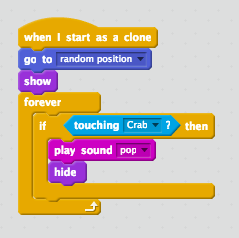
Can you figure out what this does?
We have a character that moves, we have collectibles, now let's make a score
First, we need to make a variable.
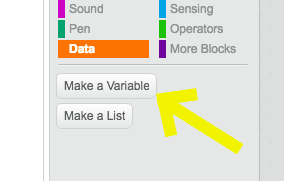
Give it a name (like "Score") and click "ok"
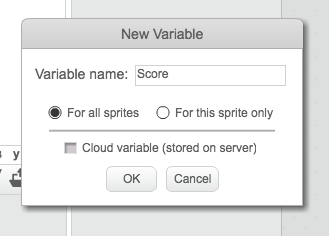
Now you have a bunch of new code blocks to use!
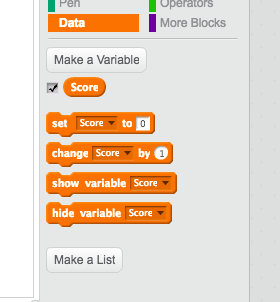
We need to do 2 things:
1. When the game starts we should reset to a score of 0
To do this we use the set score to 0 block. You need to add this so it runs at the beginning of the game.
Here looks good:
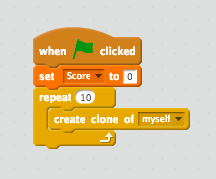
2. When we touch a collectible we should increase our score by 1
We do by using the change score by 1 block. We need to add it to the bit of code that happens when our collectible touches our main sprite.
Like this:
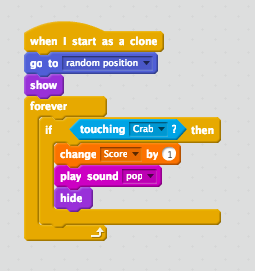
Great, let's test it!
Good work. But there are still plenty of things you could add to make it better. Here are some suggestions:
Your teacher can help you get started with any of those ideas